Workflows for People Who Don’t Run Pipelines
Most of the 10,000 or so federal websites aren’t run by specialized, cross-functional web teams.
The sole person responsible for the site is usually a program manager, communications specialist, or business analyst. More often than you'd expect, maintaining the agency's or office's public website falls somewhere under "other duties as assigned." A handful of civil servants end up responsible for the lifecycle of these digital assets, whether or not their job title includes "web". But accessibility tools and security workflows assume the opposite.
Cloud.gov Pages exists for those small agency teams who want the reliability and compliance posture of enterprise‑class infrastructure without having to build and operate it themselves. They're largely communications teams without dedicated engineering resources.
In theory (and often by policy or law) the sites they maintain should be checked regularly for things like WCAG violations or common web vulnerabilities. In practice, the tools that detect website issues are built for engineers. Setting them up typically involves CI pipelines, deployment credentials, configuration files, and a fair amount of familiarity with the output.
Even once a scan runs, the results can be difficult to interpret. Most scanning tools return long lists of rule violations tied to standards-specific success criteria. Security and vulnerability reports are even harder to read. An OWASP ZAP report, for example, is extremely thorough but nearly impossible to understand unless you already know what you’re looking for.
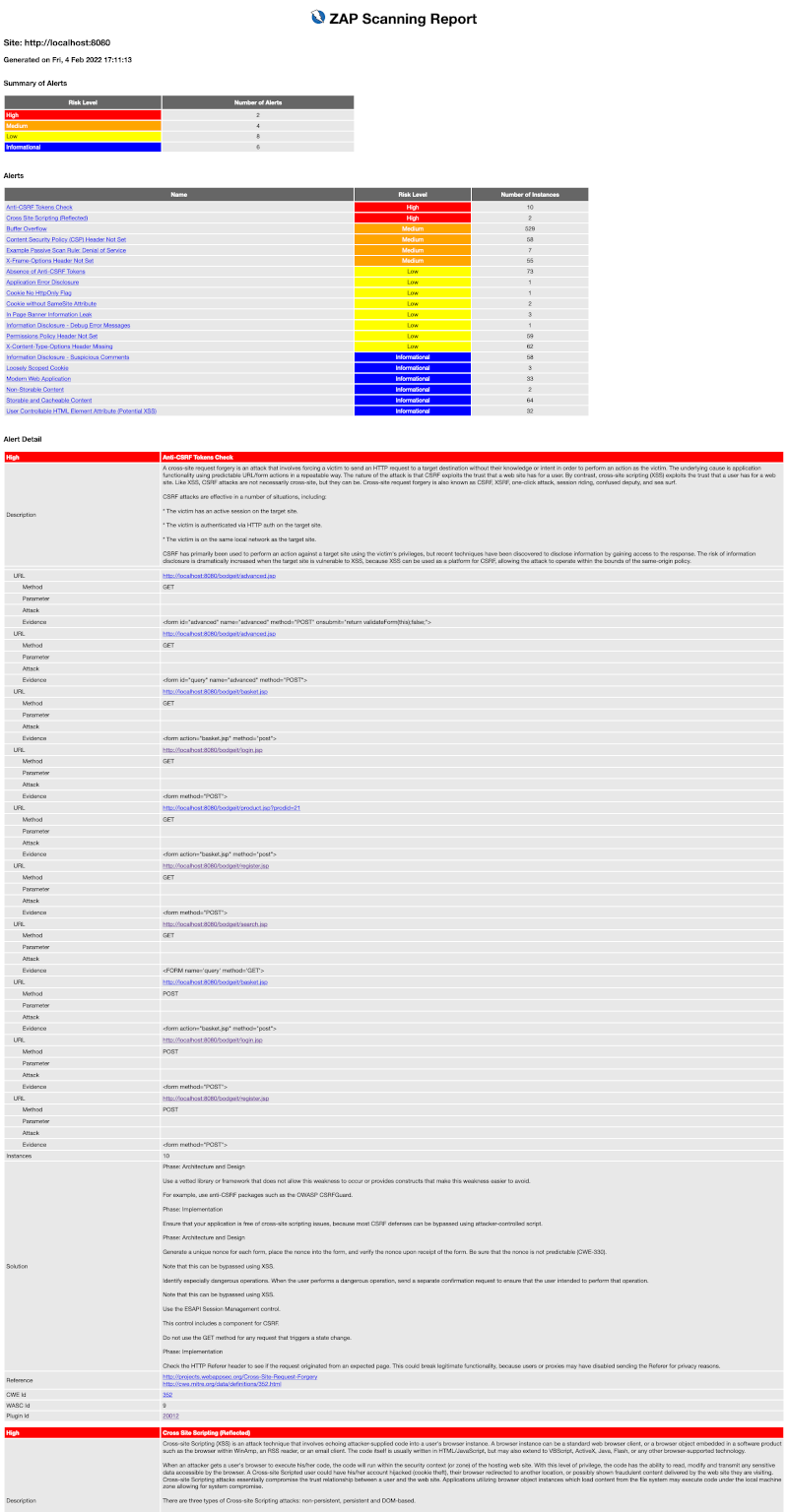
It turns out that nearly all of our customers were either not running these reports regularly, or when they were, still had trouble answering: what’s broken, where is it, and how do I fix it?
If nearly every team on our platform has to solve the same problem of figuring out how to set up and run automated scans, then interpret and address the results, that’s something we have the opportunity and responsibility to fix once, for everyone.
Accessibility scans and vulnerability scans don't even start from the same unit of analysis, and the raw results they produce are structured in completely different ways.
Accessibility scans start with rules.
Like other similar tools, the axe-core project runs a set of known accessibility rules against the DOM of a single page and reports which rules were violated. For every failed rule, it lists the specific elements (nodes) that triggered the violation. In other words, axe-core is evaluating the page against a checklist of quality standards:
So axe-core answers a question like: "Which accessibility rules does this page break, and where?"
ZAP works more like a security sniff test.
It crawls the entire site and probes for patterns that associated with common vulnerabilities: missing headers, suspicious responses, unsafe configurations, and so on. When something looks like a recognizable problem, it records an alert explaining what it observed, how serious the potential issue might be (risk), and how confident the scanner is that the signal represents a real vulnerability (confidence).
So ZAP answers a different question: "Did anything about this application’s behavior suggest a security problem? If so, why?"
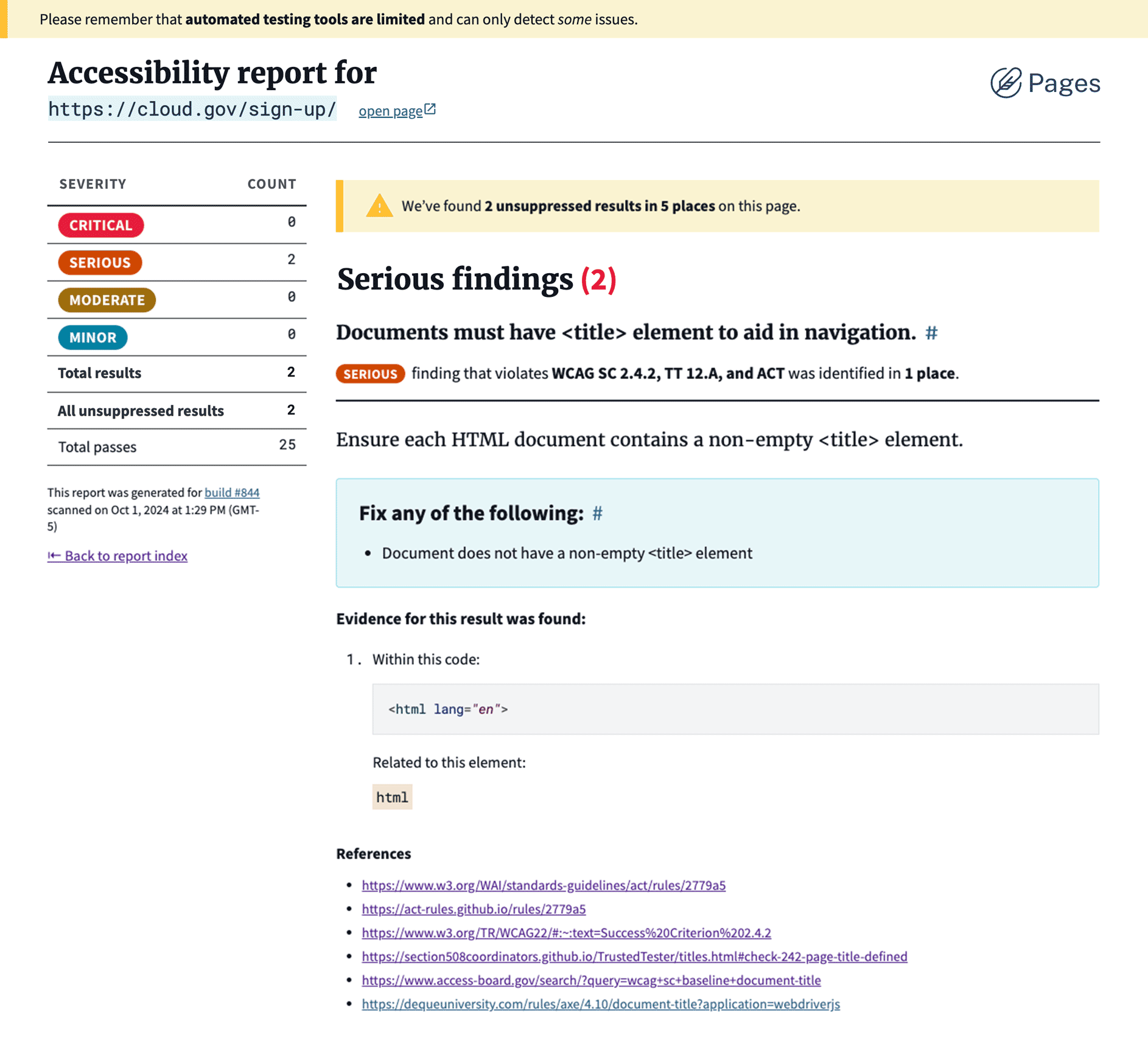
Axe-core lists:
- Each rule tested
- Which rules passed and failed
- Where the issue appears on the page
- How much it may affect the user experience
- Suggestions for how to fix the issue
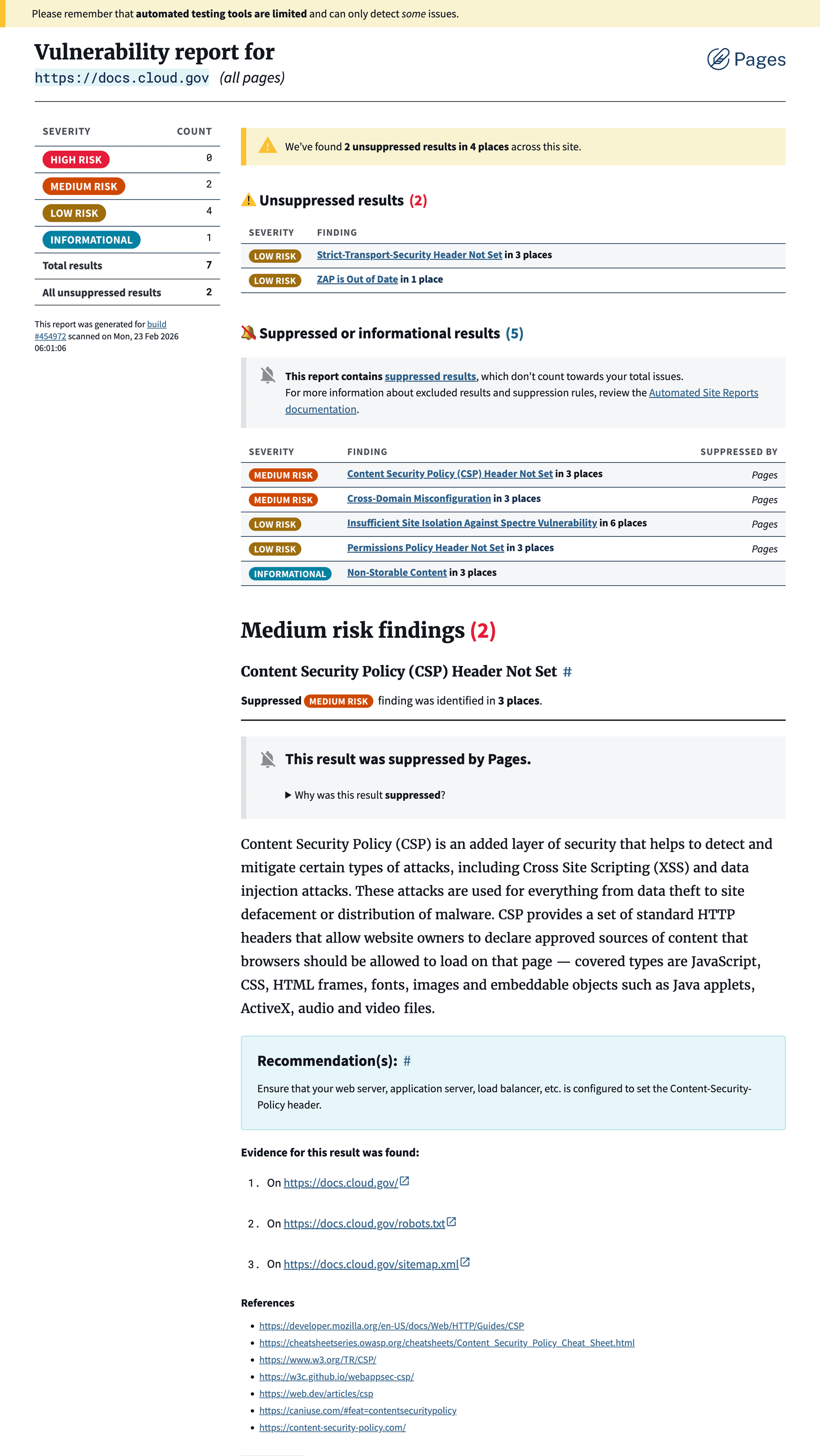
ZAP alerts identify:
- Something that looks suspicious
- How big a deal it might be
- How sure we are
- Where it was discovered
- General guidance for addressing issues like this
Those are very different ways of thinking about problems. One is evaluating the site against known rules and best practices. The other is detecting familiar signals that something might be unsafe.
But neither model matches the questions a website maintainer is trying to answer. Most people responsible for a site aren’t thinking in terms of rules, nodes, alerts, or risk. They want to know something much simpler: what’s broken, where is it, and how do I fix it?
We needed a structure that could show both accessibility and security findings in the same interface without forcing users to understand the scan technology underneath.
Every result in one of our automated scan reports addresses the questions that our users need answered, in order:
- What is it called?
- How bad is it?
- Where does it happen?
- What’s going on?
- What should someone do about it?
- Where can I learn more?
Even when starting from different scan engine schemas, the scanning tools were ultimately describing the same basic ingredients: what the issue is, where it happens, how serious it might be, and what someone should do about it.
| Scan Report | axe-core | OWASP ZAP |
|---|---|---|
| Title | help |
alert |
| Severity | impact |
risk and confidence |
| Location(s) | nodes and targets |
instances and evidence |
| Explanation | description |
description |
| Recommendation | failureSummary |
solution |
| Reference(s) | helpUrl |
references |
Each field in the finding model translates something slightly different from the scanners:
- Title turns scanner terminology into something readable. In axe-core, this comes from the rule’s
helptext. In ZAP, it comes from the alert’sname. - Severity normalizes the scanners’ scoring systems. axe-core provides
impact, while ZAP splits its signal betweenriskandconfidence. - Locations answer the question maintainers actually care about: where should I look? In axe-core, this comes from
nodes, each of which includes atargetshowing the affected element. In ZAP, this comes frominstances, which may also includeevidence. - Description explains what the scanner observed. Both tools provide a
description, but they mean different things: axe-core describes the accessibility rule in plain language, while ZAP describes the suspicious behavior that triggered the alert. - Recommendation translates the scanner’s remediation guidance into something actionable. In axe-core, this comes from
failureSummary; in ZAP, it comes fromsolution. - References link back to supporting documentation. In axe-core, this includes
helpUrlplus some supporting WCAG and other links. In ZAP, it comes from the list insidereferenceURLs.
In a few places, this translation layer also gives us the chance to normalize phrasing. Some accessibility rules are written as test assertions (“Ensures links have discernible text”), which reads awkwardly when surfaced as a finding. The report adjusts those slightly so they read more naturally as guidance.
Designing for deprecation
Long-running platforms that depend on open source tools carry some risk. Maintainers move on, dependencies get deprecated, companies buy out the source and archive the repo.
So the Pages reports don't rely naively on axe-core or ZAP. Instead, each scanner feeds its results through a small adapter layer that translates the raw output into the Pages finding model.
This adapter layer does two important things:
-
It prevents the product from inheriting the quirks of either scanner. The reports speak in language we are responsible for, not axe-core’s rule format or ZAP’s alert schema.
-
It keeps the system flexible. If one of the scanners needs to be replaced in the future, the report structure, and the experience of reviewing it, can remain the same. That stability is important in government, and in compliance activities that need to show consistency over time. It also means we don't have to retrain users every time we make an engineering change.
In other words, the experience avoids a leaky abstraction. Users see findings about their site, organized the way they think, not the internal structure of the tools that detected them. Should we ever add a third or fourth report type, the structure we have established stands ready to format the necessary information in practical, actionable, and approachable outlines.
Attention has a cost
During early reviews and usability testing with agency teams, we heard a consistent reaction: the reports were far easier to understand than the raw scanner output. But early feedback also surfaced a new problem.
Our testers, particularly those who have been responsible for reports like these before, were worried about how quickly the findings would pile up.
Vulnerability scans are more of a sniff test than a definitive list of infractions. Security tools are intentionally cautious: it's better to flag something that might be a vulnerability than miss something important. Even healthy sites accumulate warnings over time. No scan comes back completely clean every time. (If it does, double-check — it probably didn’t run correctly.)
Left unchecked, that kind of signal quickly turns into alert fatigue. When every report surfaces the same warnings, people stop looking at them entirely, which defeats the purpose of running the scans in the first place.
An open source tool can reasonably offload that responsibility. But we’re operating infrastructure our customers depend on, and compliance takes more than simply running the scans. Our customers need to run accessible, safe websites for their agencies, and we owe them the tools to make that possible.
Hidden, but not missing
Hiding likely irrelevant findings entirely would make the report appear cleaner, but it could imply that certain checks weren't run at all. Keeping known issues visible preserves transparency, but it also risks overwhelming the report and diluting its urgency.
Some findings represent real issues someone plans to fix. Others are edge cases, false positives, or things the site owner can’t control. For years, we’ve documented a set of commonly flagged alerts that don’t apply to our customers’ pre-built, statically hosted sites or platform-managed infrastructure.
I want to be clear that the goal here isn’t “make number go down”, but to focus attention on issues a site owner can actually do something about.
Our customers needed a middle way to suppress but not completely remove expected results, and so did we. It’s not the same as ignoring a finding, disabling the check entirely, hiding or excluding it from the report, or simply acknowledging it and moving on. Suppressed findings are still accounted for, while not contributing to the total "issue count" that's displayed in the summary for that build.
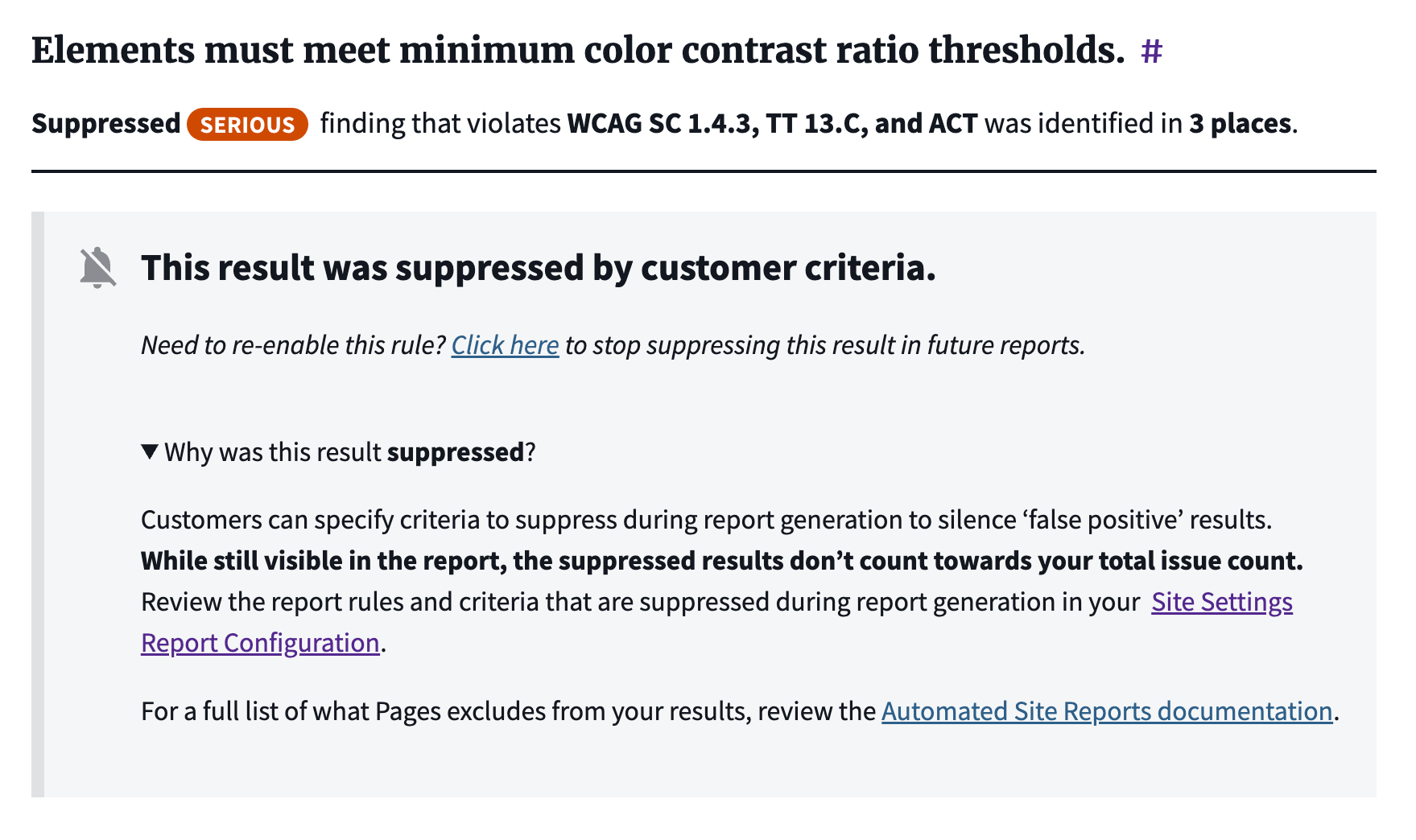
Over time, this turns the reports into something more useful than a one‑time scan.
They become a running record of a site’s health: new issues appear when something breaks, known issues remain visible but contained, and resolved issues disappear. That actually matches real life maintenance cycles, instead of an artificial security schema.
One accessibility specialist reviewing the new scans commented:
“This is the most user-friendly implementation of axe-core that I know of, including commercial offerings from Level Access, Deque, and Siteimprove. It will be a game changer for Cloud.gov Pages customers to have this available.”
The scanners are still doing the heavy lifting behind the scenes, but the report now answers the question maintainers actually care about — what’s broken, where should I look, and what should I fix next?